

5.1. HTTPS#
When data is transmitted over the internet, it can be intercepted by malicious actors. One of the most common threats in unsecured communication is a man-in-the-middle attack (MITM attack). In a MITM attack, an attacker positions themselves between a user and a website to intercept, modify, or steal information.
5.1.1. Types of MITM Attacks#
Eavesdropping: The attacker passively listens to unencrypted network traffic, capturing sensitive data such as usernames and passwords. These can be used to login at a later time or sold to others.
Session hijacking: The attacker steals a user’s session token, allowing them to impersonate the user for their current session.
Data manipulation: The attacker intercepts communication and tampers with the content before forwarding it to the intended recipient in real time.
5.1.2. HTTPS (Hypertext Transfer Protocol Secure)#
To prevent MITM attacks, websites should use HTTPS to encrypt data and protect users. HTTPS is the secure version of HTTP. It ensures that all data transferred between a web browser and a server is encrypted, preventing any kind of MITM attack.
Since all communication is encrypted HTTPS also ensures that website is genuine, since the website uses a certificate to prove its identity.
5.1.3. Did You Know?#
Note
You can check if a website you are visiting using HTTPS by looking in the URL bar.
For example on Google Chrome you can click the “horizontal” slider icon on the left side of the URL bar. This will show a popup stating whether you are using a secure (HTTPS) connection to the web server.
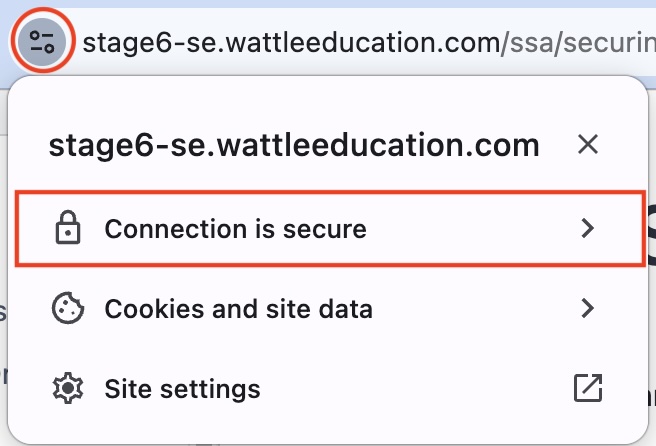
Clicking on “Connection is secure” will show more information and allow you to inspect the certificate the website uses.
5.1.4. HTTPS Connections#
HTTPS relies on TLS to secure the connection. When a client (such as a web browser) connects to a web server using HTTPS, the connection follows a specific process:
-
The client sends the server with a request for a secure connection on port 443.
The client and server establish a shared secret key per standard TLS handshake (refer to Secure Communications > Secure Communication and TLS)
Encrypted communication - subsequent requests and responses are encrypted using the shared key
5.1.5. Glossary#
- MITM attack#
Man-in-the-middle attack. An attack where the attacker positions themselves between a user and a website to intercept, modify, or steal information.
- Eavesdropping#
Passively listening to unencrypted network traffic to capture sensitive data.
- Session hijacking#
Stealing a user’s session token to impersonate the user during their current session.
- Data manipulation#
Intercepting communication and changing its content before forwarding it to the intended recipient.
- HTTPS#
Hypertext Transfer Protocol Secure. The secure version of HTTP that uses TLS to encrypt data between a web browser and web server.
Note
HTTP was not originally designed with encryption capabilities. In order to add security on top of HTTP without causing compatibility issues for servers and browsers, it was decided that HTTPS was to be separate protocol. Therefore HTTP uses a different port, 443, rather than HTTP’s port 80.
Code Challenge: Are We Using HTTPS?
Complete the home() route of the provided Flask app so that it shows whether the page has been served securely over HTTPS or not.
When the page is served securely it must show:
SUCCESS: This request is using HTTPS.
When it is not served securely it must show:
WARNING: This request is NOT using HTTPS.
Detecting HTTPS
Each flask route function has a request object available. One of the properties of this object is is_secure which we can use to check that if request was received over HTTPS.
Here’s how to use it:
@app.route("/")
def home():
    print(request.is_secure)
    return "WARNING: I'm not sure if this connection is secure."
Download the scaffold and write your code in app.py.
SCAFFOLD_are_we_using_https.zip
Solution
Solution is locked